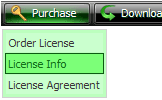
Create your menu using "Add button" and "Add submenu's item's buttons.
Use various ready to use Templates. Double click on the Template to apply it.
Change button appearance for normal and mouse over states and set buttons/submenus link properties and link target attributes.
Save your menu as project file, as HTML page or insert your menu into the existing HTML page
PULL DOWN MENU CSS SAMPLE
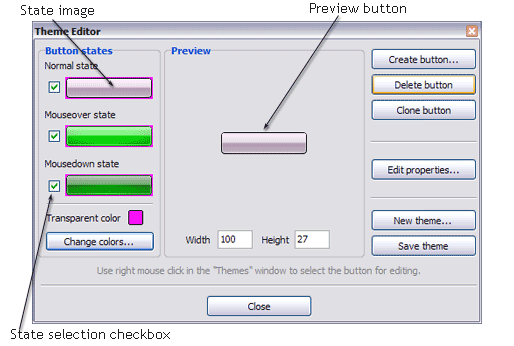
Create buttons in theme editor To open Theme editor right-click "Tools/Theme editor" in the Main menu. Theme editor helps you create your own themes or modify existing ones. To select a button you would like to edit, just lick it in the Themes toolbox.
Create button... - to add new button to the current theme. After you click the "Create button" button, the "Create New Button" dialog will appear.
Load image - to open button states image file (*.bmp)
Total images - to define how many button state images are in the opened file. The button states image will then be divided into this number of state images.
State � offset fields - to set the state image for each Normal/Hot state of the button. If you set state offset to 0 then the topmost state image will be used for the state. If you set state offset to 1 then the second state image will be used etc. State 1 corresponds to the Normal state, state 2 - to the Hot state, state 3 - to the Pressed state.
Create button - to add the button to the current theme.
Delete button - to delete the button from the current theme.
Clone button - to create a copy of the button in the current theme.
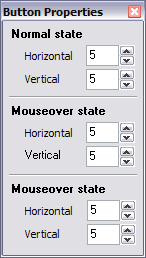
Edit properties... - to edit the button state images' edge width. After you click the "Edit properties..." button, the "Button properties" toolbox will appear.
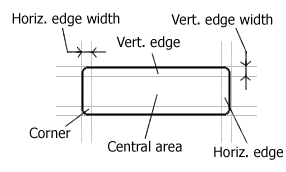
Horizontal and Vertical - to define edge width for each state. Edges are not scaled when you change the button size. Using edges is useful when you would like the button to have border. Then, if the border is within the edges, it won't be scaled.
Central area is scaled in both directions. Corners are not scaled. Vertical edges are not scaled in vertical direction. That is, when you change the button height, vertical edges will not be scaled. And vice versa, horizontal edges are not scaled in horizontal direction.
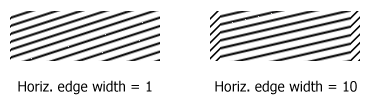
Example: Let's say, we have the following button (size: 50x50):
Let's change it's width to 150:
As you can see, in the left image (Horiz. edge width = 1) whole button image was scaled to fit its new size. In the second case (Horiz. edge width = 10) left and right edges of the button were not scaled. Same with the vertical edge width.
Transparent Color - to set the transparent color. When you add new button, transparent color is automatically set to match the color of the top-left corner of the button states image.
New theme... - to create a new theme. "Create New Theme" dialog will appear, where you should enter theme name and special notices (for example your copyright info, email, etc.).
Save theme - to save theme changes.
Close - to close Theme editor.
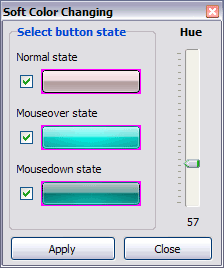
Change colors... - to exchange web button images colors. After clicking the "Color exchange" button, the "Color exchange" dialog will appear. Select the state(s) you want to be affected by clicking the checkbox next to the state image.
Move slider to find the color you like.
Wight and Height fields - to set the preview button size.
DESCRIPTION
Use images for backgrounds of submenus and items, icons, arrows. Using web images you can create menus completely based on graphics.
Design both horizontal and vertical menus and submenus with any amount of menus on a single page.
Place any HTML code inside the menu item - be it a flash-object, form, picture, or text. This ability lets you to build various menus of any complexity.
Easy to Use
GUI interface to create your pull down menu css sample menus easily and in no time
Sensible menu parameters for manual editing
Creer Un Menu Dynamique Facilement
Total control of all menu parameters
Each parameter of a html buttons may be easily changed, allowing you to achieve the required result.
You can set such parameters as direction, size, color, font face, font style, shadow, icons, alignment, links, targets, tooltips, word wrap, and other parameters.
Any change can be undone by pressing "Undo" button.
Css Page Setup Javascript
Css Horizontal Hover Pull Down Menu Css Sample
Total control of all menu parameters
Each parameter of a html buttons may be easily changed, allowing you to achieve the required result.
You can set such parameters as direction, size, color, font face, font style, shadow, icons, alignment, links, targets, tooltips, word wrap, and other parameters.
Any change can be undone by pressing "Undo" button.
CssPullDownMenu Functional Samples. AJAX Menu; Javascript API; Cross Frame Menu; Popup Menu; Highlighted Items How to change the font color if the user click on csspulldownmenu? Return to Recent
HTML Code for CSS DropDown Menu Tutorial CSS Drop DownMenus. CSS Hover Navigation. Intro for CSS Enthusiasts; Demonstration HTML; csshover.htc file; Vertical CSS Pop-Out Menu. SEO Consultants Sample
jQuery & CSS Example Dropdown Menu | Design Reviver Or perhaps adding a slower animation to the pullingdown of the menu, that would but still with some details about setting up a nice one level CSS drop-downmenu.
Chrome CSS Drop DownMenuSample form to demonstrate hover over windowed objects in IE5.5 to IE6 via iframe shim technique. IE7+ not affected by issue.
jQuery & CSS Example Dropdown Menu | Design Reviver Or perhaps adding a slower animation to the pullingdown of the menu, that would but still with some details about setting up a nice one level CSS drop-downmenu.
matt mcinerney: CSS Drop DownMenuCSS Drop DownMenu. After playing with some javascript menus today, I decided to see if I could pull off a drop downmenu without any javascript.
CSS Javascript Menu - Samples Mozilla Style Template dhtml pulldownmenu Myspace Style Template drop downmenu View data-file of this sample View css-file of this sample
jQuery & CSS Example Dropdown Menu | Design Reviver Or perhaps adding a slower animation to the pullingdown of the menu, that would but still with some details about setting up a nice one level CSS drop-downmenu.
Stu Nicholls | CSSplay | CSS only menus Another drop-down horizontal menu using only CSS. Doors drop-line menu � 13-01-2007 Pulldown tabs menu Button Menu fifteen A three state menu using a single
HTML Code for CSS DropDown Menu Tutorial CSS Drop DownMenus. CSS Hover Navigation. Intro for CSS Enthusiasts; Demonstration HTML; csshover.htc file; Vertical CSS Pop-Out Menu. SEO Consultants Sample
Css Rollover MenuSampleCss Rollover Menu Examples. Make your web Common Style - CssMenu Code Sample Common Style - Webpage Menu Bar Common Style - Dynamic Slide DownMenu
jQuery & CSS Example Dropdown Menu | Design Reviver Or perhaps adding a slower animation to the pullingdown of the menu, that would but still with some details about setting up a nice one level CSS drop-downmenu.
DHTML MenuSamples - Samples DHTML Menu has several functional samples which help you to use the dhtml menus absolutely based on Cascading Style Sheets Javascript pulldownmenu can drop down sub
CSS Pulldowns Ryan Keefer wrote: > Does anyone have any suggestions for a CSS pulldown menu system that > will work in IE? There are a list of pulldown menu systems at: http
CssPullDownMenu Functional Samples. AJAX Menu; Javascript API; Cross Frame Menu; Popup Menu; Highlighted Items How to change the font color if the user click on csspulldownmenu? Return to Recent
Tab MenuCssSample Common Style - Html PullDown Tab Common Style - Web Page Menus Common Style - Menue Sample Common Style - Menu Submenu Con Css so there no drop downmenus that
Pure CSS Drop DownMenu on 11/28/2007, -1/+75 I like this site and all the samples: http://www.cssplay.co.uk/menus/ co.uk/ has a much better resource for all things CSS, including drop downmenus
PullDownMenus In Dhtml Template A lot of pre-designed pulldownmenus in dhtml samples ; Hundreds of visual effects ; Custom CSS styles can be applied for all menu settings ; Unrivalled Features